Manual · 07
Several meshes as one
A character made of several meshes, such as a body with a separate head, or props that squash into each other, can be deformed as one mesh, with one set of settings and one bake.
The meshes press into each other as the parts of one mesh do.
Setting up a collection
- Put the meshes in a collection of their own (child collections count too).
- Select one of them and press Set Up Collection in the Object section. With one collection to
choose from, the button names it: Set Up Collection: Character. With several (a mesh in more
than one collection, or in a collection inside another) it says how many, Set Up Collection:
Pick 1 of 2, and opens a list of them in the Outliner's order, each by its path,
Shot > Character, and with how many meshes it would deform as one. - Bake, or switch to Live, as for one object.
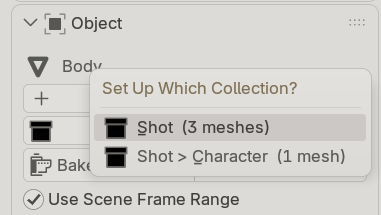 The list Set Up Collection opens for a mesh in Character, inside Shot
The list in the Scene section then has one row for the collection, with how many meshes it holds. Select
any of them and the panel shows the group's settings, with Set up together with 2 others in
<collection> under the name. Bake, Bake This Frame, Bake All, Live, Discard
Out-of-Date Frames and Remove act on the whole group. Each mesh keeps a cache file of its own.
Regions, firmness and colliders in a group
- Regions are by vertex group name, across the meshes: a region on
Kneeacts on every mesh that has a group of that name. A region can also be a whole mesh: pick the mesh icon beside the group field and choose one of the group's meshes, for a harder head than body without painting a group over the head. The line under the group field says which meshes have it. - Firmness counts where one mesh presses into another: a firm head presses the body in further.
- Colliders are other objects outside the group. The group's own meshes are never colliders: they are part of the mesh.
- A mesh put into the collection later joins the group: the row says
a mesh is not set up, its panel offers Set Up With the Collection, every mesh's frames are refused until you bake again, and the bake sets the new mesh up too. A mesh taken out leaves it.
Only meshes count, and each must be all quads, like any object here: a mesh of triangles (eyes, teeth) is refused by name. Keep it in another collection, or make it a collider. A mesh can be in one group only, and is never set up on its own as well. Set Up Collection on a collection holding a mesh already set up on its own takes it into the group; its own settings are kept, unused, and come back if it leaves.
Scale, and what makes a group re-bake
A mesh scaled by its object (not in its mesh) can look slightly different in a group than on its own: a scale of 0.96 changes it by at most 1.4% of its deformation, but a whole rig scaled far from 1, such as an import at 0.01, looks very different. Apply the scale if you want a mesh to look the same both ways.
What makes a group re-bake: an edit to any of its meshes refuses every mesh's frames, as do moving one of them, a collider moving, or scaling the whole group. Moving or turning the whole group, such as a character walking, does not: the deformation moves with it.
Linked characters: set up the overridden collection. Its settings are kept on reopen, like an object's.
A group or a collider?
Both press. The difference is what gets deformed:
| a collider | a mesh in the group | |
|---|---|---|
| is it deformed? | no, it only presses | yes, by the others, with the group's settings |
| how firm it is | one Firmness, or its own if it is set up: per vertex, by region | per vertex, by region, or a whole-mesh region |
| what it may be | any mesh | all quads |
| settings and bake | the character's own | one set and one bake for the group |
So put a body and its separate head in a group, and keep a hand prop, a chair or another character as colliders. A prop in a group is squashed too. To keep it rigid in a group, give it a whole-mesh region with Firmness 100%: the body then deforms as it does against that prop as a collider at Firmness 100%, to 0.02% of the deformation.